Introduction
Construction accounting carries complexity that most standard bookkeeping setups aren't built for. You're tracking multiple simultaneous projects, fluctuating labor costs, subcontractor payments, retainage withheld across billing cycles, and equipment that moves between jobs. A generic chart of accounts (COA) will leave gaps in every one of those areas.
The COA underpins every financial report, tax filing, and job cost analysis you run. Get the structure wrong early and you end up with income statements that don't reflect real project performance, missed deductions at year-end, and reconciliation headaches that compound over time.
This guide walks through how to set up a construction-specific COA — from numbering conventions to the specialized accounts most contractors overlook.
Key Takeaways
- Separate expenses into three tiers: Direct Costs (5000s), Indirect Costs (6000s), and G&A (7000s)
- Construction-specific accounts — retainage receivable/payable, WIP, Cost in Excess of Billings — are required to track project cash flow and billing accurately
- Use a numbered account system so the COA scales as the business grows
- Keep the main COA lean; rely on cost codes inside your accounting software for granular project-level detail
- A well-structured COA enables accurate job costing, ASC 606 compliance, and straightforward tax preparation
What You Need Before Setting Up Your Construction Chart of Accounts
Before creating a single account, clarify your business model. A sole-proprietor subcontractor, a residential homebuilder, and a multi-crew general contractor each need a different account structure. The revenue types you handle — fixed-price contracts, time-and-materials, change orders, equipment rental — determine which accounts are actually necessary.
Business and Software Requirements
Have these in place before you start:
- A complete list of current revenue sources and expense types
- A decision on accounting method — cash vs. accrual
- Accounting software built for construction, such as QuickBooks
On the accounting method question: cash vs. accrual is governed by IRC § 448 for tax purposes, with the 2026 gross receipts threshold set at $32,000,000 under IRS Rev. Proc. 2025-32.
Separately, long-term contracts — those not completed within the taxable year they're entered into — generally require the percentage-of-completion method (PCM) under IRC § 460 for tax reporting. Both are tax rules, not GAAP requirements.
Compliance and Reporting Readiness
For GAAP financial statements, FASB ASC Topic 606 requires over-time revenue recognition in two specific situations:
- The customer consumes benefits as work progresses (typical in service-type contracts)
- The asset has no alternative use and the contractor has an enforceable right to payment
A COA that can't support these recognition patterns will need a costly rebuild once the business grows or takes on bonded contracts. Build that structure in from the start.
How to Set Up a Chart of Accounts for a Construction Company
Step 1: Define Your Account Categories and Numbering System
The COA maps to five core categories aligned with FASB financial statement elements:
| Range | Category |
|---|---|
| 1000–1999 | Assets |
| 2000–2999 | Liabilities |
| 3000–3999 | Equity |
| 4000–4999 | Revenue |
| 5000–7999 | Expenses |
Within the expense range, use a three-tier structure:
- 5000–5999 — Direct Costs (labor, materials, subcontractors)
- 6000–6999 — Indirect Costs (equipment depreciation, site overhead)
- 7000–7999 — G&A Expenses (office, insurance, professional fees)
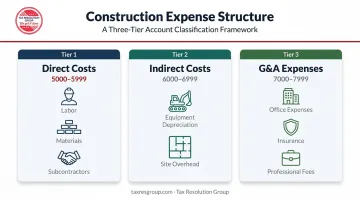
This separation is what makes construction income statements meaningful. Without it, you can't distinguish project-level profitability from company-level overhead — a distinction that shapes pricing decisions, bid strategy, and overhead recovery.
Step 2: Populate Each Category with Construction-Relevant Accounts
Work through each category and list the minimum accounts needed to capture every real transaction type:
Assets (1000–1999)
- Cash and bank accounts
- Accounts Receivable
- Retainage Receivable
- Cost in Excess of Billings
- Fixed Assets (equipment, vehicles)
- Accumulated Depreciation
Liabilities (2000–2999)
- Accounts Payable
- Retainage Payable
- Billing in Excess of Costs
- Equipment loans, lines of credit
Revenue (4000–4999)
- Contract Revenue
- Change Order Revenue
- Service/Warranty Revenue (if applicable)
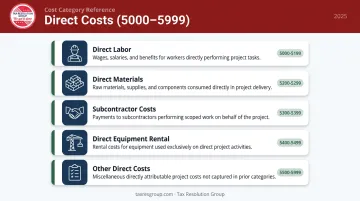
Direct Costs (5000–5999)
- Direct Labor
- Direct Materials
- Subcontractor Costs
- Equipment Rental (direct)
- Other Direct Costs (permits, inspections)
Keep the list lean. A five-person subcontractor doesn't need an account for "international equipment leasing." Add accounts only when a real, recurring transaction type requires one — not speculatively.
Step 3: Configure the COA in Your Accounting Software
Once you've finalized the structure, enter it into your accounting platform with the correct account types, numbers, and names. For QuickBooks users, three configuration steps matter most at this stage:
- Enable class tracking to separate divisions or project types
- Activate job costing so expenses post against individual projects
- Map each account to the correct account type (asset, liability, income, expense)
Set these up during initial configuration — adding them after the fact means reclassifying historical data. Tax Resolution Group offers QuickBooks setup and training for construction businesses, including custom account structuring and job costing configuration matched to your workflow.
Step 4: Integrate Job Costing and Validate with a Test Transaction
Link each direct cost account to a corresponding cost code — labor, materials, equipment, subcontractor — so expenses post at both the company level and the individual project level simultaneously.
Then run a test transaction before going live:
- Record a sample vendor invoice to a direct cost account
- Assign it to a specific job
- Confirm it appears correctly on the income statement
- Verify it flows to the job cost report, not just the general ledger
- Check that the balance sheet reflects any related liability (AP)
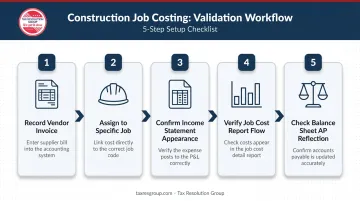
This validation step catches mapping errors before they contaminate real financial data.
Construction-Specific Accounts You Cannot Afford to Skip
A construction chart of accounts differs from a generic one because project-based revenue requires accounts that a standard template simply doesn't include. Omitting them produces financial statements that misrepresent the company's true position.
Retainage Accounts (AR and AP)
Retainage (the percentage withheld by clients until project completion) typically runs 5% or 10% of project cost according to CFMA, and can exceed the contractor's total profit on a job. It must live in separate accounts:
- Accounts Receivable – Retainage (asset): amounts earned but contractually withheld
- Accounts Payable – Retainage (liability): amounts you're withholding from subcontractors
Mixing retainage with regular AR/AP distorts cash flow projections and creates reconciliation headaches at project closeout.
Under ASC 606, retainage classification depends on whether the right to consideration is conditional, meaning it may be presented as a receivable or a contract asset depending on the situation. FASB issued a staff educational paper in April 2025 specifically clarifying presentation and disclosure requirements for construction contractors.
Work-in-Progress (WIP) Accounts
According to the AICPA & CIMA, WIP schedules enable calculation of earned revenue through the percentage-of-completion method and are central to accurate construction accounting — yet some small business owners fail to prepare them at all.
Your COA needs two WIP accounts on the balance sheet:
- Cost in Excess of Billings (asset): costs incurred but not yet billed
- Billing in Excess of Costs (liability): amounts billed beyond costs incurred to date
Both accounts map to what ASC 606 calls a contract asset and a contract liability. Without them, your balance sheet won't reflect actual project status, and percentage-of-completion revenue recognition becomes impossible to support.
Direct Cost Subcategories
Once your balance sheet accounts are in order, the income statement side matters just as much. Each direct cost category belongs in its own account, not collapsed into a single "Cost of Goods Sold" line:
- Direct Labor
- Direct Materials
- Subcontractor Costs
- Direct Equipment Rental
- Other Direct Costs (permits, inspections, bonds)
The breakdown is what enables job profitability analysis. If subcontractor costs, materials, and labor are all pooled together, you can't identify which cost category is running over budget on a given project.
Indirect Costs and G&A — Keep Them Separate
These two categories are distinct and shouldn't be mixed:
Indirect Costs (6000s): support multiple projects but can't be tied to a single job:
- Small Tools & Supplies
- Safety & Compliance
- Vehicle Fuel
- Indirect Labor (site supervisors, estimators)
G&A Expenses (7000s): company-level overhead unrelated to field operations:
- Office Salaries
- Office Rent
- Professional Fees (CPA, legal)
- Business Insurance
- Marketing
Keeping these in separate account ranges prevents a distorted view of project-level vs. company-level costs — and makes it much easier to calculate accurate overhead allocation rates.
Key Variables That Determine Your COA Structure
No two construction companies should have identical COAs. The right structure depends on several operational factors.
Business Type and Scale
A sole-proprietor subcontractor running a handful of annual projects needs a leaner COA than a multi-crew general contractor managing 20+ concurrent jobs. Smaller operations can consolidate indirect costs into a few accounts. Larger ones typically need each indirect cost category broken out separately to support meaningful overhead analysis.
Number of Revenue Streams
Companies earning from multiple sources need separate revenue accounts for each stream — it's the only way to measure which work types are actually profitable. Common revenue streams to track separately include:
- Construction contracts
- Change orders
- Service and maintenance work
- Equipment rental
A single-revenue business can use a simpler structure.
Software Capabilities
Design the COA alongside the software being used. QuickBooks supports class and location tracking, which can replace many subaccounts and keep the COA lean. Simpler platforms may require more accounts to achieve the same visibility. Confirm what your software can handle before finalizing your account structure — building around its limitations avoids rebuilding later.
Common Mistakes When Setting Up a Construction Chart of Accounts
Overcomplicating with Too Many Accounts
Creating a separate account for every conceivable expense type makes the COA unwieldy and increases miscategorization risk. The fix: use cost codes within the accounting software for granular project-level detail, and keep the main COA limited to meaningful categories. A COA with 200 accounts is harder to maintain accurately than one with 60.
Skipping Retainage and WIP Accounts
Many contractors — especially those new to project accounting — omit these entirely. Retainage gets treated as regular revenue, and project costs get expensed immediately. The result: financial statements that overstate early-period income and understate late-period liabilities.
These errors compound at tax time and become especially difficult to unwind during an IRS audit. The IRS Construction Industry Audit Technique Guide specifically identifies failing to record year-end costs and improperly using accounting methods as common audit issues.
Using a Generic COA Without Industry Customization
Importing a default chart of accounts from accounting software — or using a template designed for retail or service businesses — misses the cost structure and integration requirements that construction demands. CFMA's construction accounting guidance specifically describes separating costs into direct construction costs, indirect costs, and G&A as a foundational industry convention.
A generic setup typically lacks:
- Direct/indirect/G&A cost separation for accurate job costing
- WIP account structure required for percentage-of-completion reporting
- Retainage tracking aligned with contract billing cycles
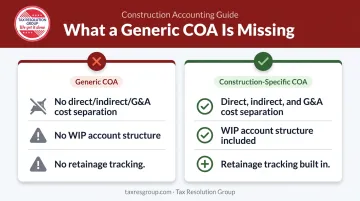
A generic setup usually requires a costly rebuild once the business scales or pursues bonded work.
Frequently Asked Questions
How do you do accounting for a construction company?
Construction accounting relies on job costing, a COA structured to separate direct costs, indirect costs, and G&A, and the correct revenue recognition method for your contract types. For long-term contracts, that means percentage-of-completion under ASC 606 for GAAP and IRC § 460 for tax.
What is the journal entry for a construction company?
For a typical project expense, debit the relevant direct cost account (e.g., Direct Labor or Direct Materials) and credit Accounts Payable or Cash. Every entry must reference the specific job — without it, the expense hits the general ledger but never feeds the project cost report.
What are the five major chart of accounts categories?
Assets, Liabilities, Equity, Revenue, and Expenses: these map directly to FASB financial statement elements. In construction, the Expenses category expands into Direct Costs (5000s), Indirect Costs (6000s), and G&A (7000s) to support accurate project-level reporting.
Do construction companies need job costing integrated into their COA?
Yes. The COA should be structured so each direct cost account aligns with a corresponding job cost category — labor, materials, equipment, subcontractor. This allows expenses to be tracked at both the company-wide level and the individual project level at the same time.
What is the difference between Cost in Excess of Billings and Billing in Excess of Costs?
Cost in Excess of Billings (an asset) reflects costs incurred but not yet billed; Billing in Excess of Costs (a liability) reflects amounts billed beyond costs incurred to date. Both are WIP balance sheet accounts required under ASC 606 for over-time revenue recognition.
How often should a construction company update its chart of accounts?
Review the COA annually at minimum. Additional updates are warranted when adding new service lines, taking on larger contract types, or switching accounting software. A CPA with construction accounting experience will spot when the current structure is limiting your reporting accuracy.