
Outsourcing bookkeeping is one of the most direct ways to reclaim that time. But handing off your financial records to someone else carries real risks if done carelessly.
This guide walks through every step of the process — from assessing your needs and choosing the right provider format to onboarding and setting up protocols that protect your data. It also covers when outsourcing makes sense, what to prepare beforehand, and where most small businesses go wrong.
Key Takeaways
- Define your bookkeeping scope before contacting any provider to avoid scope gaps and surprise charges
- Virtual bookkeepers typically offer broader talent access and lower costs than local alternatives
- Software compatibility (particularly QuickBooks) is one of the strongest predictors of a smooth engagement
- Never give a bookkeeper full administrative access ; role-based permissions protect your accounts
- Monthly review of deliverables is your responsibility, not your provider's
How to Outsource Bookkeeping for Your Small Business
Step 1: Assess Your Needs and Get Your Records in Order
Before you contact a single provider, get clear on what you actually need outsourced. The scope you define drives both cost and provider fit.
Tasks to evaluate:
- Transaction recording and data entry
- Bank and credit card reconciliation
- Accounts payable and receivable
- Payroll processing
- Financial reporting (P&L, balance sheet, cash flow)
- Tax prep support
Next, take an honest inventory of your current records. Note how far behind your books are, which accounting software you use (if any), and whether catch-up work will be needed before ongoing service can start. Catch-up bookkeeping is typically scoped and priced separately from monthly ongoing work — factor this into your budget early.
Also flag any industry-specific requirements. Media and entertainment companies have revenue recognition structures that differ sharply from, say, an inventory-heavy retailer or a nonprofit with fund accounting needs. A provider who doesn't understand your industry will miscategorize transactions from day one.
Step 2: Choose Your Outsourcing Format
Two decisions shape your provider search: local vs. virtual, and freelancer vs. firm.
Local vs. Virtual:
- Local bookkeepers work best for businesses with physical records, cash transactions, or a preference for in-person meetings
- Virtual bookkeepers offer access to a wider talent pool, cloud-based workflows, and are generally more cost-effective — a strong fit for remote-first or digitally operated businesses
Freelancer vs. Firm:
- Freelancers offer personalized attention and lower price points, but carry availability risk — illness, competing clients, or burnout can disrupt your books
- Firms provide backup coverage and broader service capability (payroll, tax prep, CFO-level support), but at higher cost
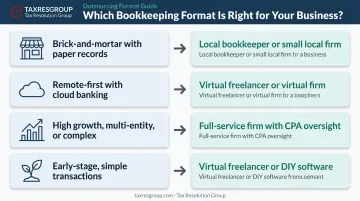
Quick decision guide:
| Business Type | Recommended Format |
|---|---|
| Brick-and-mortar with paper records | Local bookkeeper or small local firm |
| Remote-first with cloud banking | Virtual freelancer or virtual firm |
| High growth, multi-entity, or complex | Full-service firm with CPA oversight |
| Early-stage, simple transactions | Virtual freelancer or DIY software |
Step 3: Vet and Interview Candidates
Credentials and software proficiency matter more than pricing at this stage.
Screening criteria:
- Professional certifications (CPA, QuickBooks ProAdvisor, or equivalent)
- Verified experience in your industry
- Proficiency in your accounting software
- A documented onboarding process with clear steps from kickoff to first deliverable
Interview questions that reveal competence:
- What's included in your standard monthly service, and what triggers an additional charge?
- How do you communicate with clients — and what's your typical turnaround on questions?
- How do you stay current on tax law changes that affect my industry?
- Can you walk me through your onboarding steps, start to first deliverable?
Software compatibility deserves particular attention. If you use QuickBooks Online, your provider should have deep familiarity with setup, bank feeds, and month-end close workflows — not just login credentials. Tax Resolution Group, for instance, builds QuickBooks setup and training into its bookkeeping engagements, which cuts onboarding time and reduces the miscategorization errors that tend to pile up in the first 60 days.
Before committing, ask for sample deliverables — a reconciliation summary, a monthly P&L — and check at least two references from clients in a similar industry or size.
Step 4: Onboard Your Provider and Establish Operating Protocols
A structured handoff prevents the most common early-stage problems.
What a proper handoff includes:
- Granting secure, role-limited access to your accounting software and bank feeds (read-only where possible)
- Sharing 12 months of historical records as a baseline
- Providing context on your revenue model, expense categories, and any recurring unusual transactions
Define the operating agreement upfront:
- Reporting frequency: monthly minimum, with clear delivery dates
- Communication channel: email, client portal, or scheduled calls
- Response time expectations for routine questions vs. urgent issues
- Escalation path for discrepancies or scope questions
Set a 30-day and 60-day check-in on the calendar before you finish onboarding. These checkpoints exist to catch miscategorizations, scope gaps, and process mismatches before they compound into a reconciliation nightmare.
When Should You Outsource Your Bookkeeping?
Outsourcing bookkeeping makes sense at the right moment, not automatically.
Clear signals it's time:
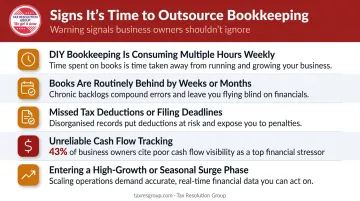
- DIY bookkeeping is consuming more than a few hours per week consistently
- Books are routinely behind by weeks or months
- You've missed tax deductions or filing deadlines
- Cash flow tracking is unreliable — QuickBooks' 2025 financial literacy data reports 43% of small business owners say cash flow is a problem, with 74% saying challenges have stayed the same or worsened
- Your business is entering a high-growth phase or seasonal surge with increased transaction volume
When it may not yet be necessary: Pre-revenue businesses with minimal transactions are often well-served by basic accounting software until volume justifies the monthly cost of a provider. Complexity and time are the real factors to watch. Once bookkeeping hours start competing with time you need to run and grow the business, that's a clear indicator it's time to bring in outside help.
What You Need Before Outsourcing Your Bookkeeping
Preparation determines how quickly a provider delivers accurate results. Businesses that show up to onboarding organized cut weeks off the setup timeline.
Equipment and Software Requirements
Confirm you have a cloud-based accounting platform your provider can access — QuickBooks Online, Xero, or equivalent. Without this, expect delays and added setup costs before meaningful work can begin. If you're currently using desktop software or spreadsheets, migration should happen before, not during, the onboarding process.
Records and Access Readiness
Gather at minimum:
- 12 months of bank and credit card statements
- A current chart of accounts (or a list of expense categories you use)
- Outstanding invoices and unpaid bills
- Payroll records for the current year
- Prior year tax returns
Security and Permission Setup
Before granting access, configure role-based permissions inside your accounting software. A bookkeeper needs sufficient access to record transactions and pull reports, but should not be able to initiate payments, wire transfers, or modify payroll runs.
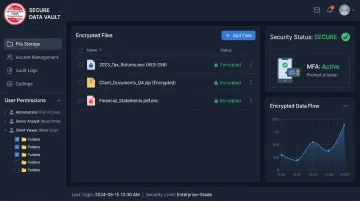
Confirm your provider uses encrypted file sharing and multi-factor authentication. Tax Resolution Group, for example, uses encrypted file storage and enterprise-grade infrastructure (AWS, Box.com) — the kind of security posture any reputable bookkeeping provider should have in place before you hand over financial access.
Key Factors That Affect Your Outsourced Bookkeeping Results
Choosing a provider is only step one. These four variables determine whether the engagement actually delivers.
Scope Definition
Vague scope creates two failure modes: tasks fall through the cracks because each party assumed the other covered them, or surprise charges appear for work the owner thought was included. A written scope of work — listing every deliverable, its frequency, and explicit exclusions — prevents both problems before they start.
Software Compatibility
Mismatched platforms introduce errors from day one. If your provider works in a different version of the software, or imports data manually from your system into theirs, expect reconciliation discrepancies and slower month-end close. Matching ecosystems — both using QuickBooks Online, for example — enable real-time bank feeds, automated categorization, and faster reporting overall.
Communication and Reporting Cadence
Monthly financial reports are the minimum. Without them, you're flying blind — and errors go undetected long enough to affect real decisions. Make sure to establish:
- A single point of contact on both sides
- A defined delivery date for monthly reports
- A clear escalation path for urgent questions
Transaction Volume and Business Complexity
A provider scoped for 50 transactions per month will struggle — and make errors — if your volume spikes without a scope adjustment. Revisit pricing and scope whenever your business changes materially: new revenue streams, added employees, expanded inventory, or acquisition activity all warrant renegotiation.
Common Mistakes When Outsourcing Bookkeeping
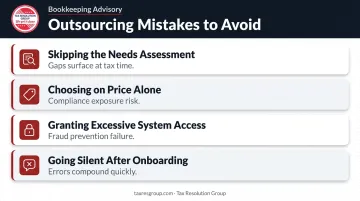
- Skipping the needs assessment. Starting with provider outreach before defining scope leads to over-servicing (paying for tasks you don't need) or under-servicing (gaps that surface at tax time).
- Choosing on price alone. The IRS expects accurate records kept for at least 3 years to support income, deductions, and tax positions. Inaccurate bookkeeping from an underpriced provider creates compliance exposure that no monthly savings can offset.
- Granting excessive system access. Full admin rights — including payment authority — remove a critical fraud-prevention layer. Separation of duties applies even in small businesses.
- Going silent after onboarding. Outsourced bookkeeping is not a set-and-forget arrangement. Monthly review of deliverables is the owner's responsibility. Errors that go unquestioned compound quickly.
Alternatives to Outsourcing Bookkeeping
Outsourcing works well for many small businesses — but it's not the only option. Here's how the main alternatives compare.
DIY Bookkeeping Software
DIY software makes sense for pre-revenue or sole-proprietor businesses with simple, low-volume financials — provided the owner can commit consistent time to it.
The upside is obvious: lower cost. The catch is that without professional review, error risk is higher, tax season prep falls entirely on the owner, and the time burden compounds as the business grows.
Hiring an In-House Bookkeeper
In-house makes sense for businesses with high transaction volume, multi-entity structures, or operations that genuinely require on-site financial oversight.
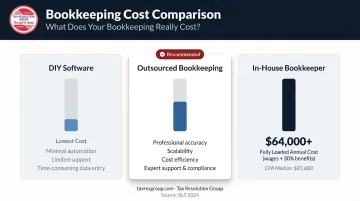
The trade-off is cost. The BLS reports the median annual wage for bookkeeping and accounting clerks was $49,210 as of May 2024. Factor in benefits — which BLS data shows add roughly 30% on top of wages — and the fully loaded cost exceeds $64,000 annually. That's well above most outsourced bookkeeping arrangements.
Using Your CPA for Bookkeeping
This works for catch-up work immediately before filing or one-time cleanup projects — but it's expensive as a routine arrangement.
BLS puts median annual pay for accountants and auditors at $81,680, versus $49,210 for bookkeeping clerks. Paying CPA rates for routine transaction recording is a cost mismatch. Reserve your CPA for tax strategy, compliance review, and financial analysis — not data entry.
Tax Resolution Group structures its services differently: the same team that maintains your books also handles tax planning, IRS representation, and Part-Time CFO work. That means the records feeding your tax strategy are built and reviewed by the same professionals acting on them.
Conclusion
Outsourcing bookkeeping works when the groundwork is solid: scope defined, records organized, software aligned, and communication protocols established before the first deliverable is due. Most outsourcing failures trace back to skipped preparation or undefined expectations — not the concept itself.
Follow the steps in this guide, set your 30/60-day checkpoints, and stay engaged with your monthly reports. Outsourcing works best when you step back from the mechanical work, not from the financial picture itself. Staying informed means you keep the visibility needed to make sound decisions — without getting pulled into the day-to-day data entry that slows you down.
Frequently Asked Questions
How much does it cost to outsource bookkeeping?
Costs vary widely based on transaction volume, services included, and whether catch-up work is needed. Bench lists plans starting at $399/month. Get quotes based on your specific scope — volume, accrual vs. cash basis, and reporting frequency all affect pricing.
Should I outsource my bookkeeping?
If bookkeeping is consuming multiple hours per week, your books are routinely behind, or you've missed deductions or deadlines, outsourcing is worth serious consideration. For most small business owners, acting earlier rather than later reduces the cost of getting records caught up.
Is AI replacing bookkeepers?
AI is automating repetitive tasks — data entry, categorization, reconciliation — and the BLS projects a 6% decline in bookkeeping clerk employment through 2034. But human oversight remains essential for accuracy, exception handling, and compliance. AI handles the routine work; humans handle the rest.
What tasks can an outsourced bookkeeper handle for my small business?
Core tasks include transaction recording, bank reconciliation, accounts payable and receivable, payroll processing, and financial reporting. Tax prep support is often available as an add-on. Scope varies by provider — confirm what's included and what's billed separately.
What's the difference between an outsourced bookkeeper and an accountant?
Bookkeepers handle day-to-day transaction recording, reconciliation, and reporting. Accountants provide higher-level analysis, tax strategy, and compliance work. Many small businesses benefit from both — particularly when working with a firm that integrates the two functions under one roof.
How do I protect my financial data when outsourcing bookkeeping?
Configure role-based access permissions before handoff, and never give a bookkeeper payment authority or full admin rights. Confirm your provider uses encrypted file sharing and multi-factor authentication — these are baseline security requirements, not optional extras.